
Speak your idea. Get a finished reel.
The AI Reel Kit makes three kinds of reel on your Mac: a cartoon mascot of you, your AI twin, or a video you filmed. You say "make a reel about X". Claude writes the script, you say yes, and the kit builds the reel with captions, scenes and sound.
- The kit, a demo mascot and a guide PDF
- Mascot reels, AI twin reels and filmed reels
- A review page for every reel you make
- Every new version of the kit, free
- About 1¢ of voice per reel after that
Tick the box first. New to Claude Code? Start with the free beginner guide.
Get the kitNeeds a Mac. Windows is not supported yet.
Digital product. You keep the whole kit, so every sale is final. No refunds.
My cartoon, my voice. Made from one photo. 58 seconds.
My HeyGen twin video, edited by the kit. 55 seconds.
What's inside
Everything sits in one course space on Circle
The kit
A zip you unzip into your workspace and open in Claude Code. Type "set up my reel kit" and Claude takes it from there.
A demo mascot
Ready with all 15 poses and its first reel. Your first test reel works before you pay for anything.
A guide PDF
The steps on paper. Claude reads its own copy of the steps inside the kit, so you can also just ask it.
Every new version, free
When the kit gets an update, the new version goes into the same course space with a note on what changed. You pay once.
Three reels from one kit
Mascot reel
A cartoon of you on a moving stage, made from one photo. It talks in your voice. For each line of your script Claude picks one drawn object that works on your words: a terminal types, a receipt prints, a list ticks.
AI twin reel
Drop in a HeyGen twin video. The kit cuts the pauses, cuts you out of the background, times every caption word and adds the graphics. The edit is free. The twin video uses your own HeyGen credits.
Filmed reel
Drop in a clip from your phone. Same edit, same captions, same look. Free, with no mascot and no keys.
How it works
Unzip it, open it, say one line
Unzip the kit
You download one zip from the course space and unzip it.
You get one folder
Everything is inside it: the scripts, a demo mascot, the guide.
Open it in Claude Code
Open that folder in Claude Code, on your Mac.
Say "set up my reel kit"
Claude does the rest: installs, keys, and a demo reel to prove it works.
Make your mascot
Claude guides you. Use your own photo and your own style, or describe any character you can imagine. Then it gets a voice.
Say a topic, an idea or a reel link
Say "make a reel about X", even a boring topic. The kit researches it and writes the script in your voice. Or paste the link of a reel you like. It never copies lines.
Say yes to the script
Claude shows you the script. You say yes, then you wait. The kit builds the whole reel alone: voice, captions, scenes and sound.
Approve it on your review page
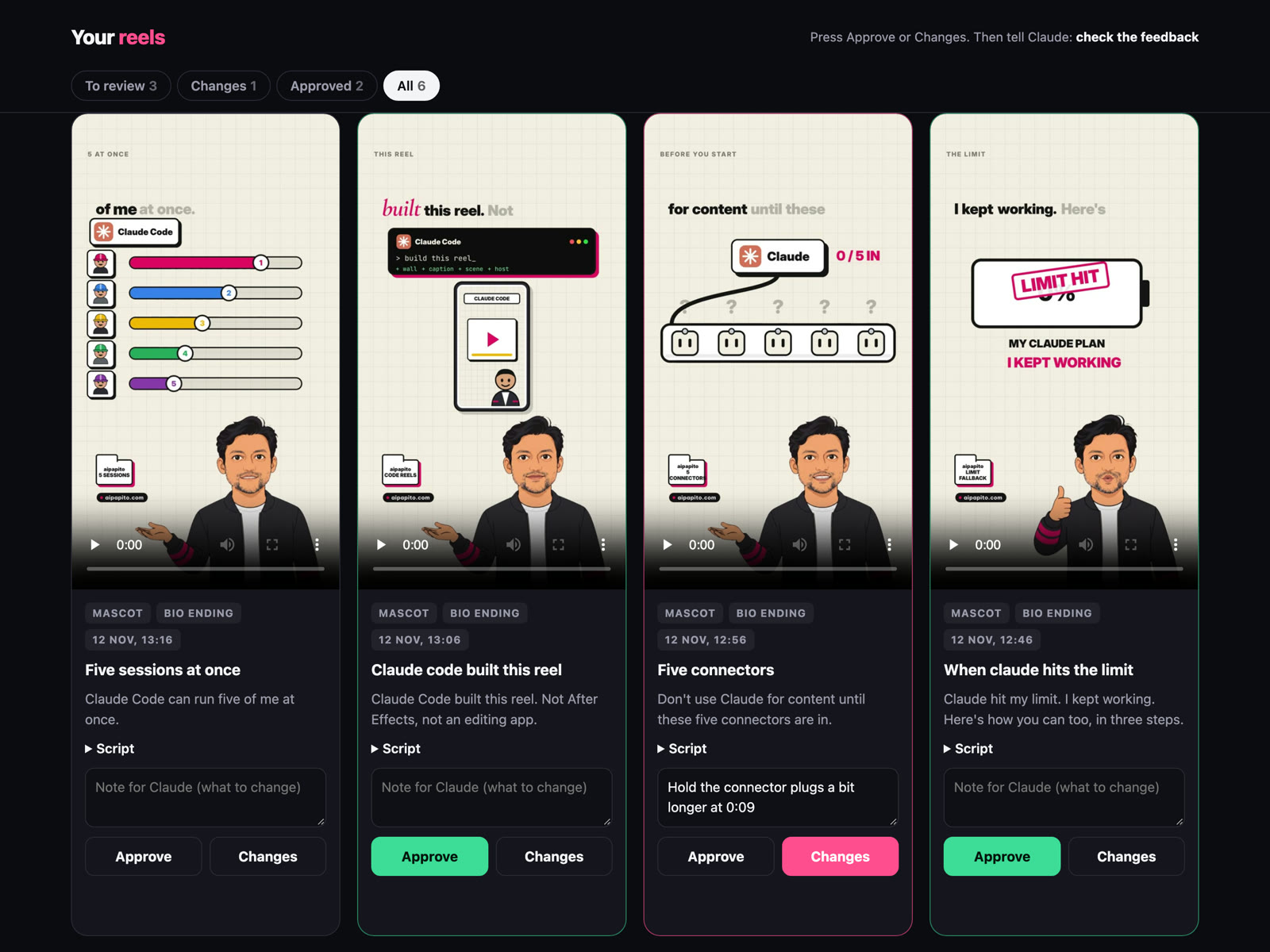
The finished reel opens on your review page. Press Approve, or type a note on what to change and Claude fixes it.
Your first mascot takes about 2 to 3 hours. Claude does most of it alone, you give notes, and 3 to 6 rounds is normal. Every reel after that takes 20 to 40 minutes. Nothing paid runs without your yes. The reel link step uses your own Apify account. It costs less than 1¢ per reel.
The script engine
A boring script gets skipped. This one gets watched.
The script decides if people stay or scroll. So the kit does not write one draft and stop. You give it a start, it runs 6 checks on the script, and then it builds the whole reel. This is every step.
Pick one way to start
-
Say a topic
"Make a reel about Claude Code hooks"
Even a dry topic. The kit researches it on the web for you.
-
Say your idea
"Claude books my calls"
Your own twist. The kit turns it into 1 angle and 3 to 5 points.
-
Paste a reel link
"Spin this reel: [link]"
A reel you like. The kit studies its hook and its idea. It never copies lines.
6 checks, in this order
- 1
It checks the facts
Each fact needs 2 sources. A fact it is not sure of stays out.
- 2
It hunts for a surprise
It finds 3 "wait, what?" facts. The best one becomes the tease.
- 3
It writes 5 hooks
5 hooks in 3 styles. The winner must stop a stranger in 2 seconds.
- 4
It writes the script
Under 60 seconds. Each line pulls you to the next. The end answers the hook.
- 5
A second AI scores it
Under 9 out of 10 means a rewrite. Up to 4 rounds.
- 6
You say yes
You read the exact words. Nothing gets built before your yes.
After your yes, the kit builds the reel alone
- 7
Your voice says it
Your cloned voice reads the script. The kit checks that every word was said.
- 8
It draws new visuals
For each line it picks one drawn object that works on your words: a terminal types, a receipt prints, a list ticks.
- 9
It adds motion graphics
Moving scenes, captions timed to each word, and sound effects.
- 10
It checks the reel
Timing, layout and sound get checked. It fixes the red rows before you see the reel.
The finished reel opens on your review page. Press Approve, or type a note on what to change and Claude fixes it.
How I use it
One script, more than one reel
A mascot reel
I give the kit a topic. Claude writes the script, I say yes, and the kit builds a mascot reel for my main profile.
The same script, as my twin
The same script becomes a twin version for my second profile. No new script. I make the twin video in HeyGen, and the kit adds the captions and graphics.
Both point to my offers
Each reel ends with "comment" for Instagram or "the full guide is in my bio" for the other apps. One idea now reaches two audiences.
The kit does this for you. Say "both" when it asks which reel to make, and it makes a folder for each version.
Review your reels
Every reel on one page
Say "open my review page". Every reel you make shows in your browser, newest first, with its script. Watch it, press Approve or Changes, and type a note. Then say "check the feedback" and Claude fixes the reels you marked.
Before you buy
Are you ready? Three yes answers
The kit runs inside Claude Code. Claude does the hard parts, but you need to know the basics first. Can you say yes to all three?
- I have Claude Code on my Mac. The Claude desktop app with a paid Claude plan (Pro or higher).
- I have opened a folder in Claude Code. You know how to pick a folder so Claude works inside it.
- I have asked Claude to build or change something. You read what it plans to do and said yes.
A "no"? Start with my free beginner guide. Do it once, then come back. The kit will feel easy.
After you buy
Where you get help
The kit is self-serve. Claude walks you through every step, and the guide has the rest.
The kit lives in my Circle
You get the kit as a course in my Circle community. Every new version lands there too.
Stuck? Comment under the kit
Post your question as a comment in the kit course. I reply there, so every buyer sees the fix.
Who it's for
Is this kit for you?
Yes, if you
- Have a Mac and use the Claude desktop app: you open a folder in it and you are good to go
- Know your subject, and your content stops when client work gets busy
- Want to post explainer reels without filming each one
- Like giving notes to an editor until it looks right
- Want your own talking videos edited the same way
Not yet, if you
- Have never used the Claude desktop app. Do my free beginner guide first, then come back.
- Are on Windows. Version 1 is Mac only.
- Want a finished reel 5 minutes after you buy. The first mascot takes 2 to 3 hours.
After the kit, you pay the services on your own keys: about $0.50 to $1 in pictures for your mascot, once, and about 1¢ of voice per reel.
Make your first reel this week
The demo mascot works before any paid step. Then your own mascot, your twin or your own video on every reel after it. Pay once, and every new version of the kit is yours.
Tick the box first. New to Claude Code? Start with the free beginner guide.
Get the kit,Needs a Mac. Windows is not supported yet.
Digital product. You keep the whole kit, so every sale is final. No refunds.